Sim Racing FOV Calculator
Use this sim racing FOV calculator to measure your cockpit once, find the physical angles of the center display and check what each racing game expects next. Choose a game before copying a setup. iRacing has a documented native monitor calculation; Assetto Corsa and ACC remain physical-reference entries because their current input rules have not been verified here. Comparing them keeps the same rig measurements without inventing equivalent game settings.
Measure Your Racing Position Once
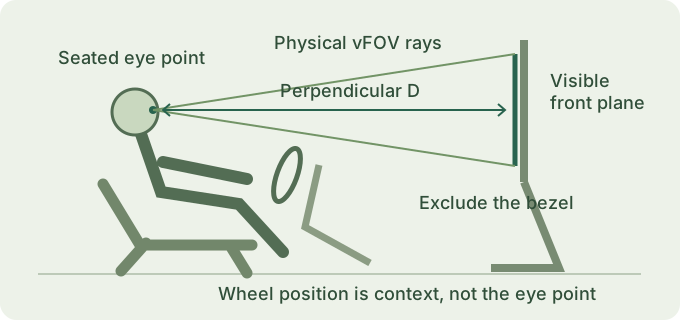
Set the seat, pedals and wheel to the position you actually drive in, then sit normally. The wheel is useful context for positioning a display, but its distance from the monitor is not eye distance. Measure perpendicular to the center display’s visible front plane, without leaning toward the tape. Recheck the distance after moving a monitor arm or changing the seat.
What to Measure on a Single-Screen Rig
Enter a decimal diagonal in inches and the actual image ratio, or choose visible width and height in Measurement options. A 27-inch diagonal is not a 27-inch width. Measure the active area and exclude the frame. An ultrawide flat panel uses the same flat geometry with its actual proportions; nominal 21:9 and exact 3440:1440 remain separate choices.
Centimeters, millimeters and inches describe the same stored lengths. The size presets are examples, not recommendations for monitor placement. Directly entered width and height take priority over marketing dimensions, and selecting a pixel resolution cannot overwrite those measurements.
What Changes for Triple or Curved Screens
Advanced Display Settings reuses the homepage’s physical models. A single curved panel needs its radius and horizontal surface arc width; diagonal input estimates an unrolled rectangle. Three flat panels need equal side angles, a defined horizontal hinge gap and eye offset. The output separates center-screen angles from combined horizontal coverage and gaps. Curved triples and unequal or vertically staggered panels are outside this model.
Compare How Racing Games Define FOV
The workbench distinguishes a documented native workflow from an unverified degree conversion. It does not assume every game accepts the physical horizontal or vertical number unchanged.
iRacing: Native Monitor Inputs
The public seating-position guide describes a native monitor calculation and separate visible and outer-width measurements. The game-setting result therefore says Requires in-game calculation. Documentation was checked on November 18, 2026; an installed client version was not tested.
Assetto Corsa: Reference Only
The current camera axis, accepted range and differences between stock software and third-party launchers have not been verified here. The card keeps physical hFOV and vFOV available, names the missing evidence and supplies no guessed slider value or unpublished guide.
ACC: Reference Only
Assetto Corsa Competizione is a separate product with its own camera and projection controls. Its current platform/build, field range and FOV convention are not established by this site. The comparison records that uncertainty rather than borrowing a rule from another title.
Why the Same Screen Can Produce Different Settings
A game can ask for an axis in degrees, a normalized control or measurements for its own rendering model. Those inputs are not interchangeable. A known horizontal or vertical rectilinear angle can be converted mathematically with the FOV converter, but that does not establish the game’s accepted axis or version-specific limits.
Enable Compare games to inspect two rule references for the same rig. Switching the primary game changes its input description, evidence and guide availability while preserving dimensions, distance and physical angles. The two cards do not claim a numerical equivalence between unverified game fields.
Read Your Calculated Cockpit View
For the example 27-inch 16:9 flat display at 60 cm, the visible rectangle is 59.77 cm wide and 33.62 cm high. The center-display physical view is 52.96° horizontal and 31.30° vertical. Both game cards refer to those same angles. Neither becomes an AC or ACC slider value, and iRacing still requires its native calculation.
Keeping the panel unchanged and increasing eye distance to 75 cm reduces the physical view to 43.45° horizontal and 25.27° vertical. Moving the monitor closer changes the geometry again. A change of game alone does not. This gives you a repeatable baseline when you alter the rig or compare configurations.
Open Narrow / Calculated / Wide illustration for a fixed roadside scene viewed through one rectilinear camera. The scene and camera position stay fixed; only the viewing angle changes. Calculated uses the single flat panel’s horizontal physical angle in a fixed 16:9 illustration. It is not a screenshot, a reconstruction of your cockpit or a measured performance result. The illustration is unavailable for advanced layouts because one camera does not represent their rendering requirements.
A measured physical view can look narrower than a familiar camera preset. That difference does not prove a calculation error. Camera position is a separate adjustment: moving the virtual driver changes the viewpoint, while changing FOV changes the angular span projected onto the display.
Apply the Result in Your Racing Game
Read Expected input / FOV type and Version scope before using a result. For a supported physical setup, choose Set up FOV in iRacing to carry the visible measurements, monitor mode and units into the assistant. Its detailed native workflow stays on that page rather than being repeated here. Outer monitor width and frame measurements still need to be taken separately; the handoff does not infer them from visible width.
For curved or triple physical models, the assistant keeps outer width and one-edge bezel separate from surface arc or hinge-gap measurements. Complete those native fields before using Compute. The official three-monitor reference gives additional context, but this workbench does not claim to configure every current multi-viewport mode. There are no active AC or ACC guide links until those pages and their rules are supported.
Copy setup records measurements, model assumptions, selected game names, evidence status and version warnings together. Share setup also preserves an optional two-game comparison in a validated link. Links contain display parameters and game choices; no saved account or cloud profile is created. The general FOV calculator remains available for broader measurement explanations.
When a Calculated FOV Looks Wrong
Check one part of the setup at a time so a later change has a clear cause.
Check the Front Plane and Units
A distance from the wheel or monitor back describes a different triangle. Confirm diagonal versus width, active area versus casing, and centimeters versus inches before changing a camera field.
Check the Axis and Projection
Horizontal degrees are not vertical degrees. Combined physical coverage is not a game’s three-view rendering field. An unverified rule needs evidence from the installed software, not an arithmetic shortcut.
Adjust the Virtual Seat Separately
A camera that is too high or too far forward may need a position adjustment. Record the measured baseline before trying changes. No value here guarantees lap times, driving skill or visual comfort.
Questions Before You Change Your Settings
Why do the physical angles stay the same when I change games?
The real panel and eye point have not moved. Game selection changes the rule reference and next step, while the physical calculation depends on the same dimensions and distance.
Can I compare AC and ACC when their input types are unverified?
You can compare their evidence status and retain one physical measurement record. The workbench supplies no numeric conversion between the games. Confirm the current camera field, platform and build before entering a value.
Does the iRacing handoff include bezel or housing width?
No. It transfers the visible dimensions, distance and units to the native measurement assistant. Measure outer width and the native tool’s requested frame values separately. One edge’s bezel thickness is not the total separation between emitting areas.
Can I use a triple-screen coverage result as one game FOV?
Coverage is the union of directions occupied by emitting panels, with gaps excluded. Side angle and center-screen FOV are separate quantities. Use a simulator’s documented multi-screen setup instead of treating coverage as a universal slider value.
Will a shared link restore an unsupported or invalid setup?
Malformed links restore the example defaults with a notice. The iRacing assistant accepts the documented monitor modes and leaves unknown outer width or bezel measurements blank. Unsupported physical models keep their explanation. Ordinary edits are not stored as saved profiles; copy a valid setup link when you want to keep a record.